 Front-end for PsTools (FePsTools) is a graphical interface around the command line tools from SysInternal’s PsTools.
FePsTools gives you an easy way to build the command you need to execute a PsTool utility. While you are clicking and typing the needed options you can see the command line build up.
Once you have created the command line, FePsTool can execute the command for you and will show you the results. It can also create a shortcut from your command line or you can copy the command line and use it in your script.
This is version 2 of FePsTools. With this new version the program is brought up to date with the version 2.44 of PsTools.
Besides a make-over of the user interface there are several other new features. Please refer to the documentation to read about the new features and fixes.
Documentation
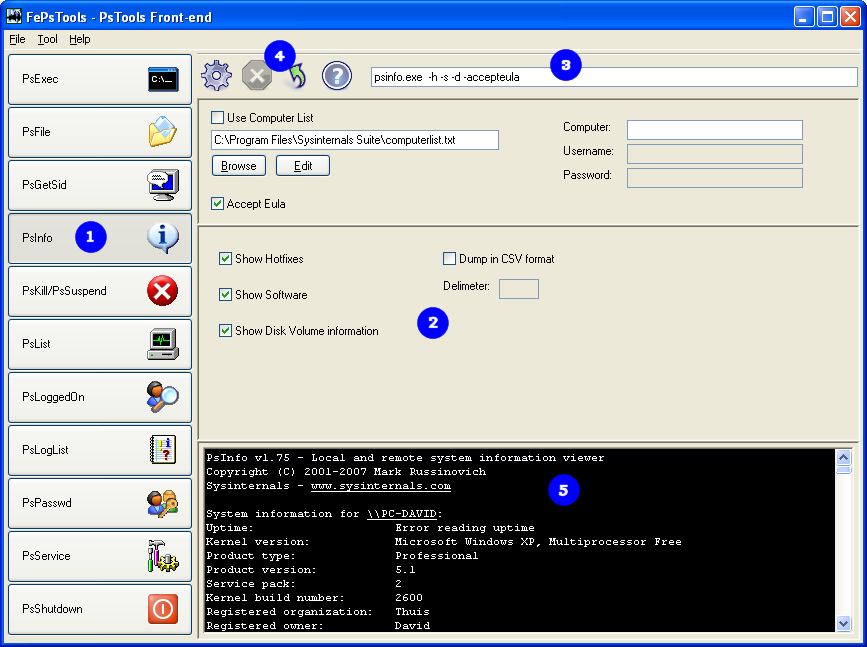
Below you see the main window of the program.
1. Click on one of the toolbuttons to display to options for the selected PsTool
2. Here you choose the switches/options that should apply to the tool
3. The command line is built while you select options and switches
4. With the Execute command you run the selected tool. Press the Cancel button to stop a running tool. Press the shortcut button to create a shortcut from the command line. Press the help button to display the help output from the selected tool.
Shortcuts
The following keys are available to quickly execute some of the available actions:
| F8 | Execute the tool |
| F9 | Cancel execution of the tool |
| Shift + F1 | Show the help output of the selected tool |
| Ctrl + F1 | Show the PsTools help page of the selected tool |
Settings
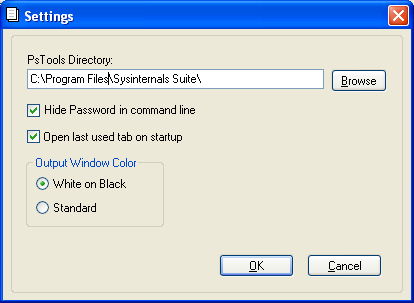
PsTools Directory
Here you fill in the path to you PsTools utilities.
Hide Password in command line
If you enable this option the password will be hidden in the command line. When you copy the command line or create a shortcut the password will be visible in plain text.
Open last used tab on startup
When this option is checked the program will remember the last selected PsTool and reopen it on startup.
Output Window Color
You can choose to have the output shown in a black window with white characters or in a grey window with black characters.
Computer List
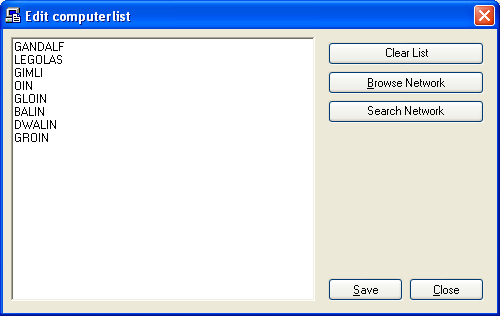
Most of the tools take a textfile with computer names as input. On the Edit computer list window you can edit your computer list. The list is a plain text file and each computer should be on a separate line.
With the Browse Network button you can browse for a specific computer to add to the list.
The Search Network button will search the network for computers and populate the list with the found computer names.
Release Notes
Version 1.0
First version release in june 2004
Version 2.0
Made up to date with the PsTools version 2.44
Quoted long names with space
Fixed several command line bugs
Password can be hidden in command line
Made Window resizable
Several GUI updates
Search network for computers and populate computer list
Added shortcuts for most common actions
Added option to show tool help output
Added option to show pstools help pages